Week 6
Machine Learning Part 2
Introduction ![]()

Machine learning (ML) is widely used in environmental science for tasks such as land cover classification, climate modeling, and species distribution prediction. This lecture explores five common ML model families available through the tidymodels framework in R, applied to the forested dataset we met last week.
Linear Regression
Logistic Regression
Trees
- Decision Tree
- Random Forest
- Boosted Trees
Support Vector Machines
Neural Networks
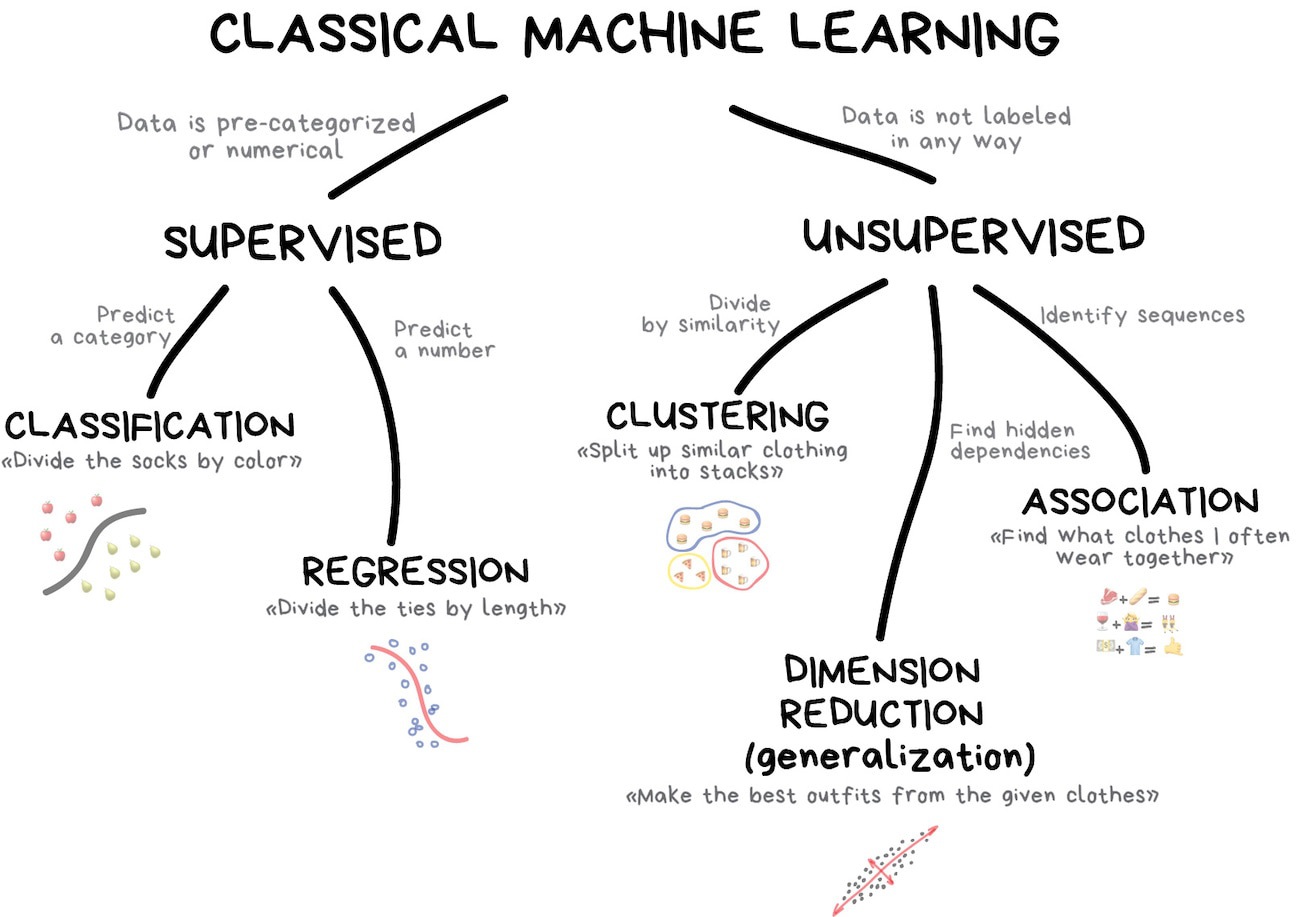
Classification vs. Regression
In tidymodels, a model’s mode tells the engine what kind of outcome it’s predicting:
Classification → Predict a categorical outcome (discrete classes).
Regression → Predict a numeric outcome (a continuous value).
Many of the same model families (trees, SVMs, neural networks, …) can do either — you pick the mode with set_mode().
Load Required Libraries ![]()
![]()
![]()


Data Preparation ![]()
![]()

We will use the forested dataset for classification. Each row is a 6,000-acre hexagon in Washington state with an on-the-ground forested label ("Yes"/"No") and 18 remotely-sensed predictors (elevation, climate summaries, vegetation indices, etc.).
set.seed(123)
forested_split <- initial_split(forested, strata = forested)
forested_train <- training(forested_split)
forested_test  <- testing(forested_split)
forested_folds <- vfold_cv(forested_train, v = 10)

# Feature Engineering: Classification
forested_recipe <- recipe(forested ~ ., data = forested_train) |>
  step_impute_mean(all_numeric_predictors()) |>
  step_dummy(all_nominal_predictors()) |>
step_normalize(all_numeric_predictors())Unified Interface for ML Models ![]()

- The
parsnippackage is a part of thetidymodelsframework - It provides a consistent interface for specifying models across many different algorithms
- The combination of a specification, mode, and engine is called a model
- Let’s look at the parsnip documentation!
Metric vocabulary — what collect_metrics() will show us ![]()

Every example below ends with a collect_metrics() call. For classification models the default output is three metrics you should know before reading them:
| Metric | What it measures | Range | Good value |
|---|---|---|---|
| accuracy | Fraction of predictions that match the truth | 0–1 | higher |
| roc_auc | Probability the model ranks a true positive above a true negative at any threshold (separation) | 0–1 | higher (>0.8 good) |
| brier_class | Mean squared error between predicted probability and outcome (calibration) | 0–1 | lower (<0.25 acceptable) |
We’ll unpack each — plus sensitivity, specificity, and the confusion matrix — after the model zoo.
Note
Regression models default to rmse, rsq, mae instead — covered in the Regression Metrics section.
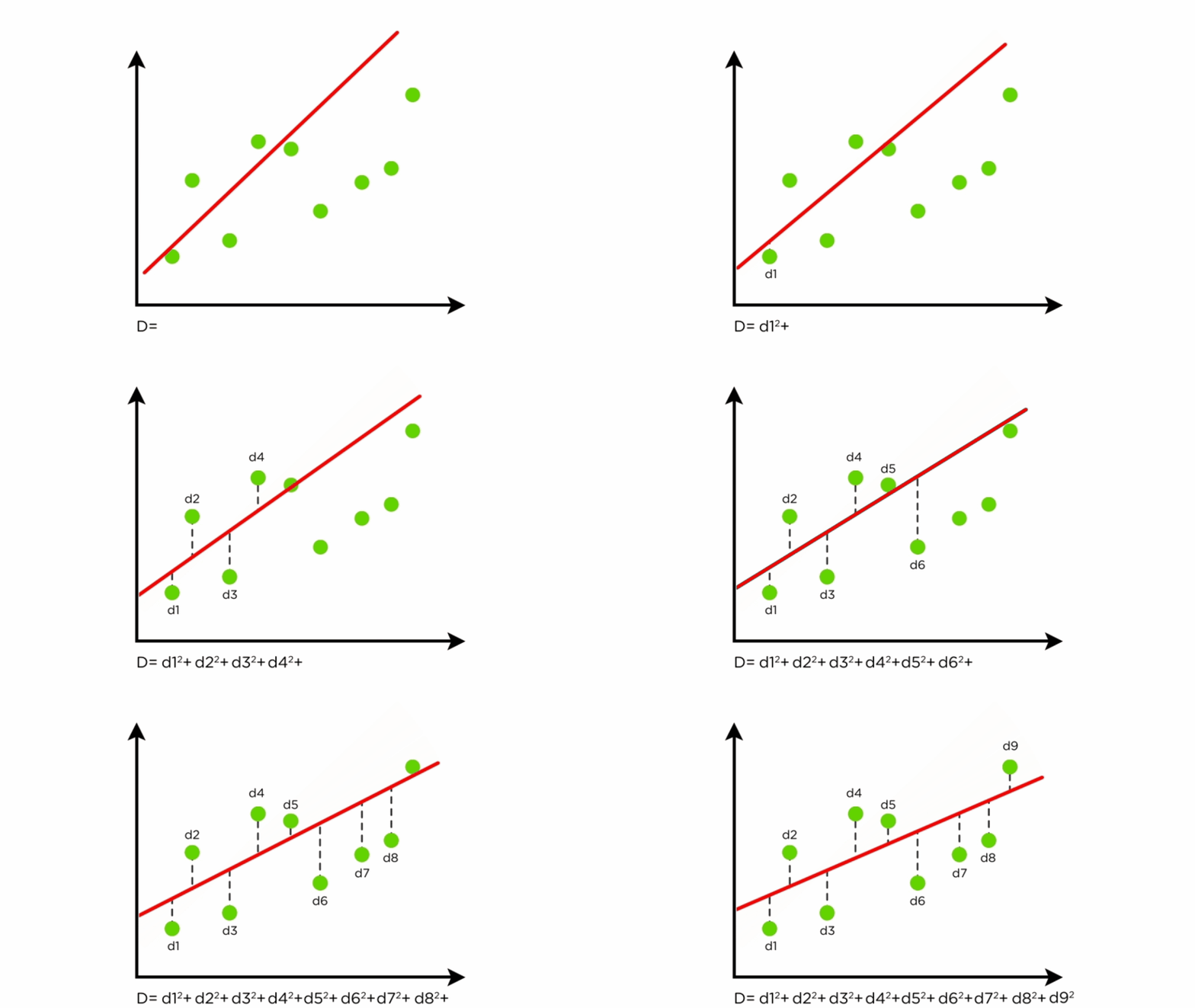
Components of Linear Regression
- Dependent Variable (Y): The variable to be predicted.
- Independent Variables (X): Features that influence the dependent variable.
- Regression Line: Represents the relationship between X and Y.
- Residuals: Differences between predicted and actual values.
Linear Regression in tidymodels
Specification
engines & modes ![]()
engine | mode | specification |
|---|---|---|
lm | regression | linear_reg |
glm | regression | linear_reg |
glmnet | regression | linear_reg |
stan | regression | linear_reg |
spark | regression | linear_reg |
keras | regression | linear_reg |
brulee | regression | linear_reg |
quantreg | quantile regression | linear_reg |
Example ![]()
![]()
![]()

Warning
This example predicts elevation from the other columns — it’s a syntactic demo of parsnip’s regression mode, not a meaningful scientific model. In a real regression problem you’d pick an outcome that represents what you actually want to estimate.
# penalty and mixture are available when engine = "glmnet" (regularized regression)
lm_mod <- linear_reg(mode = "regression", engine = "lm")

workflow() |>
  add_formula(elevation ~ .) |>
  add_model(lm_mod) |>
  fit_resamples(resamples = forested_folds) |>
  collect_metrics()
#> # A tibble: 2 × 6
#>   .metric .estimator   mean     n std_err .config
#>   <chr>   <chr>       <dbl> <int>   <dbl> <chr>
#> 1 rmse    standard   82.9      10 1.33    pre0_mod0_post0
#> 2 rsq standard 0.971 10 0.00120 pre0_mod0_post0Components of Logistic Regression
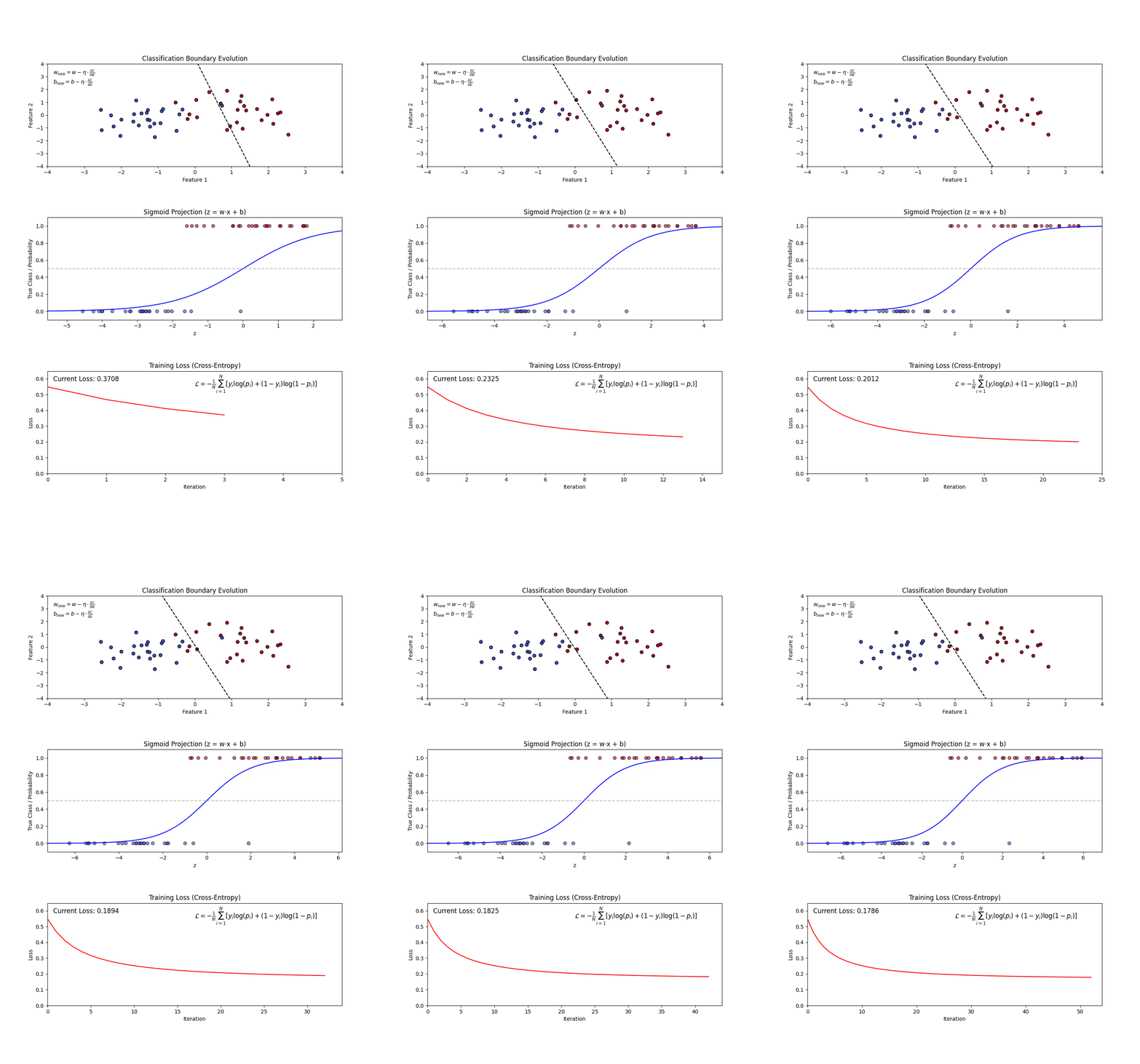
Sigmoid Function: Squashes any real number into a probability between 0 and 1. A large positive score → near 1 (“yes”); a large negative score → near 0 (“no”). (top plot: the S-curve)
Decision Boundary: Once we have probabilities, we pick a cutoff (default 0.5) to assign a class. Everything above → “Yes”, below → “No”. (top plot: the dashed line separating the two groups)
Log-Loss (Binary Cross-Entropy): The model’s training objective — penalizes confident wrong predictions harshly. Lower is better. (bottom plot: loss falling as training progresses)
Regularization (L1 and L2): A penalty added to the loss that shrinks large coefficients toward zero — prevents the model from over-relying on any single feature.
Logistic Regression in tidymodels
Specification
#> Logistic Regression Model Specification (classification)
#>
#> Computational engine: glm
engines & modes ![]()
engine | mode | specification |
|---|---|---|
glm | classification | logistic_reg |
glmnet | classification | logistic_reg |
LiblineaR | classification | logistic_reg |
spark | classification | logistic_reg |
keras | classification | logistic_reg |
stan | classification | logistic_reg |
brulee | classification | logistic_reg |
Example ![]()
![]()
![]()
log_model <- logistic_reg(penalty = 0.01, mixture = 0) |>
  set_engine("glmnet") |>
  set_mode('classification')

workflow() |>
  add_recipe(forested_recipe) |>
  add_model(log_model) |>
  fit_resamples(resamples = forested_folds) |>
  collect_metrics()
#> # A tibble: 3 × 6
#>   .metric     .estimator   mean     n std_err .config
#>   <chr>       <chr>       <dbl> <int>   <dbl> <chr>
#> 1 accuracy    binary     0.898     10 0.00392 pre0_mod0_post0
#> 2 brier_class binary     0.0778    10 0.00230 pre0_mod0_post0
#> 3 roc_auc binary 0.957 10 0.00211 pre0_mod0_post0Components of a Decision Tree
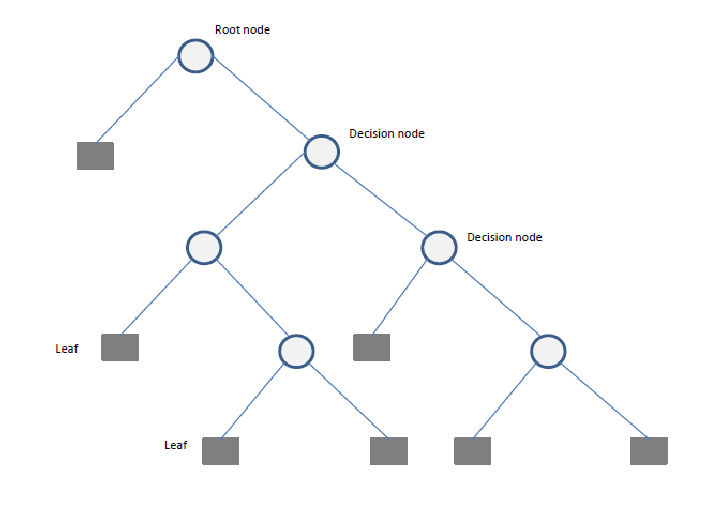
- Root Node: The starting point representing the entire dataset.
- Decision Nodes: Intermediate nodes where a dataset is split based on a feature.
- Splitting: The process of dividing a node into sub-nodes based on a feature value.
- Pruning: The process of removing unnecessary branches to avoid overfitting.
- Leaf Nodes: The terminal nodes that provide the final output (class label or numerical prediction).
Decision Tree using tidymodels
Specification
#> Decision Tree Model Specification (unknown mode)
#>
#> Computational engine: rpart
engines & modes ![]()
Example ![]()
![]()
![]()
dt_model <- decision_tree(cost_complexity = 0.01, tree_depth = 10, min_n = 3) |>
  set_engine("rpart") |>
  set_mode('classification')

workflow() |>
  add_recipe(forested_recipe) |>
  add_model(dt_model) |>
  fit_resamples(resamples = forested_folds) |>
  collect_metrics()
#> # A tibble: 3 × 6
#>   .metric     .estimator   mean     n std_err .config
#>   <chr>       <chr>       <dbl> <int>   <dbl> <chr>
#> 1 accuracy    binary     0.898     10 0.00337 pre0_mod0_post0
#> 2 brier_class binary     0.0878    10 0.00287 pre0_mod0_post0
#> 3 roc_auc     binary     0.908     10 0.00391 pre0_mod0_post0
Tip
Notice the pattern: recipe → model → fit_resamples → collect_metrics. It’s going to repeat for every model below. We’ll generalize this repetition with workflow_set() at the end so you don’t write the same four lines six times.
Components of a Random Forest
- Multiple Decision Trees: The fundamental building blocks.
- Bootstrap Sampling: Randomly selects subsets of data to train each tree.
- Feature Subsetting: Uses a random subset of features at each split to improve diversity among trees.
- Aggregation (Bagging): Combines the outputs of individual trees through voting (classification) or averaging (regression).
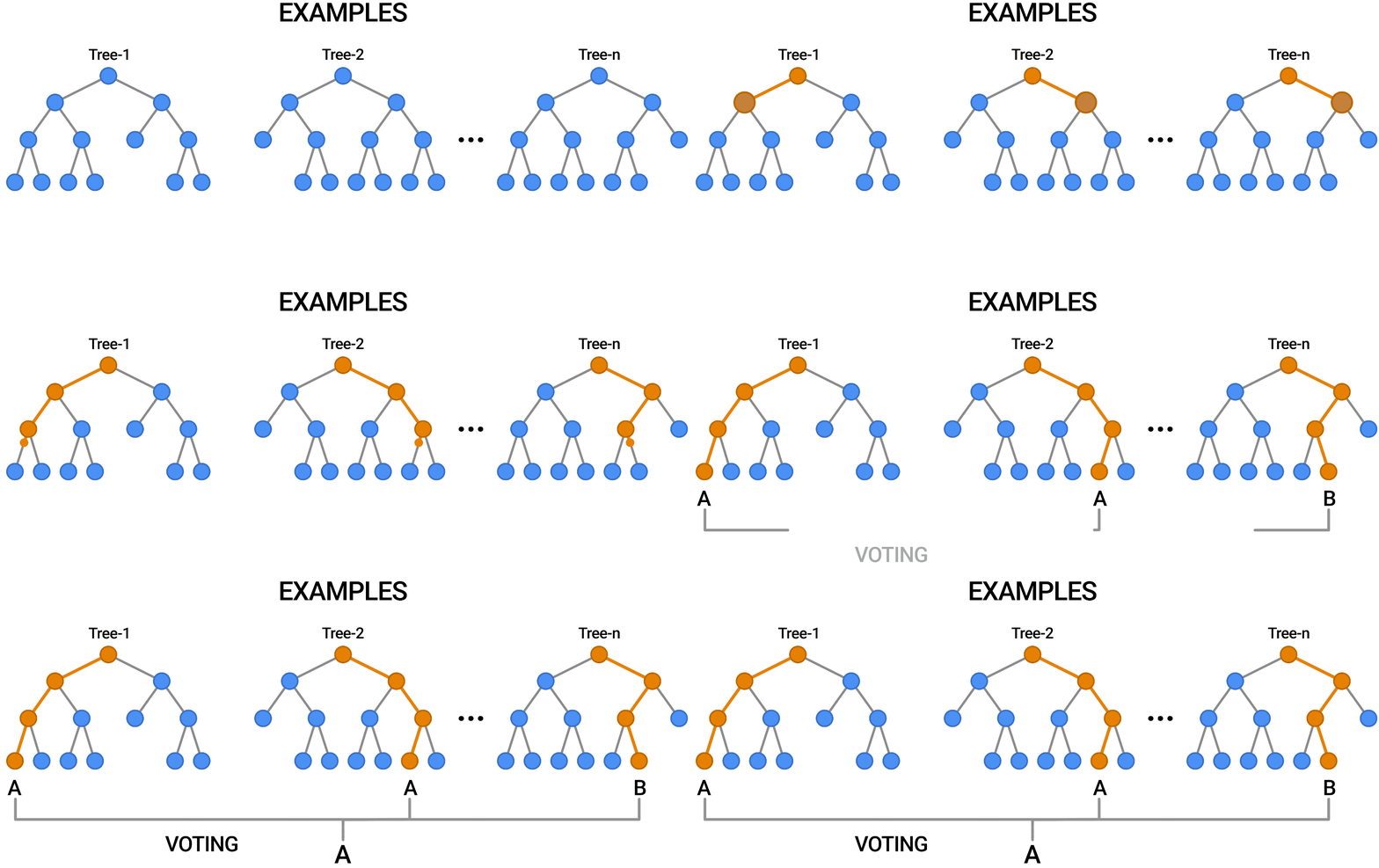
Random Forest Implementation using Tidymodels
Specification
#> Random Forest Model Specification (unknown mode)
#>
#> Computational engine: ranger
engines & modes ![]()
engine | mode | specification |
|---|---|---|
ranger | classification | rand_forest |
ranger | regression | rand_forest |
randomForest | classification | rand_forest |
randomForest | regression | rand_forest |
spark | classification | rand_forest |
spark | regression | rand_forest |
grf | classification | rand_forest |
grf | regression | rand_forest |
grf | quantile regression | rand_forest |
Example ![]()
![]()
![]()
# Define a Random Forest model
rf_model <- rand_forest(trees = 10, mtry = 4, min_n = 5) |>
  set_engine("ranger", importance = "impurity") |>
  set_mode("classification")

workflow() |>
  add_recipe(forested_recipe) |>
  add_model(rf_model) |>
  fit_resamples(resamples = forested_folds) |>
  collect_metrics()
#> # A tibble: 3 × 6
#>   .metric     .estimator   mean     n std_err .config
#>   <chr>       <chr>       <dbl> <int>   <dbl> <chr>
#> 1 accuracy    binary     0.914     10 0.00440 pre0_mod0_post0
#> 2 brier_class binary     0.0671    10 0.00236 pre0_mod0_post0
#> 3 roc_auc binary 0.962 10 0.00263 pre0_mod0_post0Boosted Trees in tidymodels
Specification
engines & modes ![]()
Example ![]()
![]()
![]()
b_model <- boost_tree(
  trees          = 15,
  tree_depth     = 6,
  learn_rate     = 0.3,
  loss_reduction = 0,
  mtry           = 1
) |>
  set_engine("xgboost") |>
  set_mode("classification")

workflow() |>
  add_recipe(forested_recipe) |>
  add_model(b_model) |>
  fit_resamples(resamples = forested_folds) |>
  collect_metrics()
#> # A tibble: 3 × 6
#>   .metric     .estimator   mean     n std_err .config
#>   <chr>       <chr>       <dbl> <int>   <dbl> <chr>
#> 1 accuracy    binary     0.910     10 0.00340 pre0_mod0_post0
#> 2 brier_class binary     0.0668    10 0.00229 pre0_mod0_post0
#> 3 roc_auc binary 0.967 10 0.00228 pre0_mod0_post0SVM in tidymodels
Specification
#> Polynomial Support Vector Machine Model Specification (unknown mode)
#>
#> Computational engine: kernlab#> Radial Basis Function Support Vector Machine Model Specification (unknown mode)
#>
#> Computational engine: kernlabengines & modes ![]()
Example ![]()
![]()
![]()
svm_model <- svm_poly(cost = 1, degree = 1) |>
  set_engine("kernlab") |>
  set_mode("classification")

workflow() |>
  add_recipe(forested_recipe) |>
  add_model(svm_model) |>
  fit_resamples(resamples = forested_folds) |>
  collect_metrics()
#> # A tibble: 3 × 6
#>   .metric     .estimator   mean     n std_err .config
#>   <chr>       <chr>       <dbl> <int>   <dbl> <chr>
#> 1 accuracy    binary     0.905     10 0.00382 pre0_mod0_post0
#> 2 brier_class binary     0.0727    10 0.00259 pre0_mod0_post0
#> 3 roc_auc binary 0.957 10 0.00255 pre0_mod0_post0Components of a Neural Network
Neurons: The fundamental units that receive, process, and transmit information.
Input Layer: The initial layer that receives raw data.
Hidden Layers: Intermediate layers where computations occur to learn features.
Output Layer: Produces the final prediction or classification.
Weights & Biases: Parameters that are optimized during training.
Activation Functions: Functions like ReLU, Sigmoid, and Softmax that introduce non-linearity.
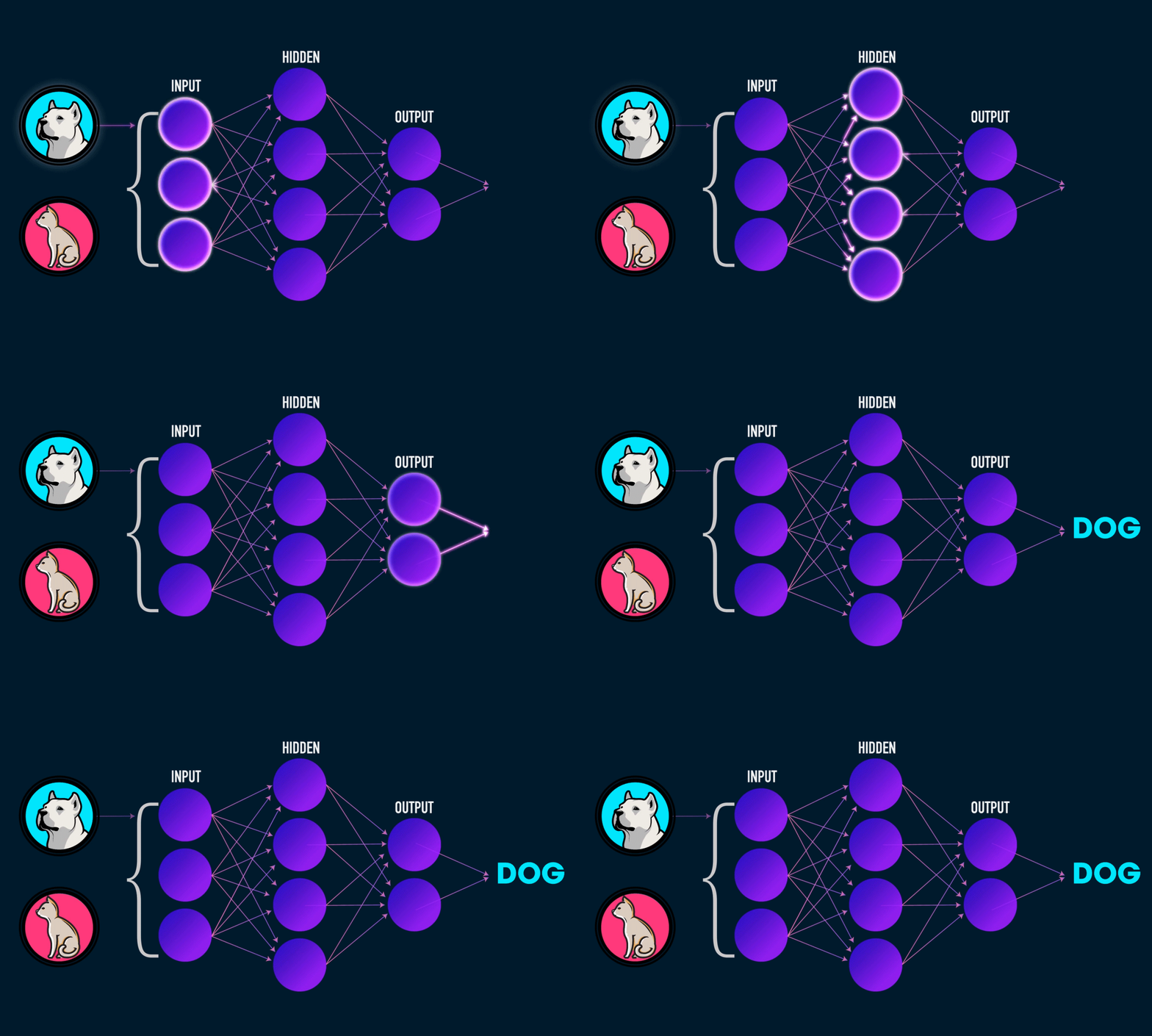
Neural Network Implementation
mlp() defines a multilayer perceptron model (a.k.a. a single layer, feed-forward neural network). This function can fit classification and regression models.
Specification
#> Single Layer Neural Network Model Specification (unknown mode)
#>
#> Computational engine: nnet
engines & modes ![]()
Example ![]()
![]()
![]()
nn_model <- mlp(
  hidden_units = 5,
  penalty      = 0.01,
  epochs       = 100
  # dropout, activation, learn_rate require engine = "brulee" or "keras"
) |>
  set_engine("nnet") |>
  set_mode("classification")

workflow() |>
  add_recipe(forested_recipe) |>
  add_model(nn_model) |>
  fit_resamples(resamples = forested_folds) |>
  collect_metrics()
#> # A tibble: 3 × 6
#>   .metric     .estimator  mean     n  std_err .config
#>   <chr>       <chr>      <dbl> <int>    <dbl> <chr>
#> 1 accuracy    binary     0.910    10 0.00326  pre0_mod0_post0
#> 2 brier_class binary     0.117    10 0.000981 pre0_mod0_post0
#> 3 roc_auc     binary     0.965    10 0.00193  pre0_mod0_post0
Wrap up ![]()
![]()
![]()
Let’s combine all the models and evaluate their performance using cross-validation.
We learned about cross-validation last week and its importance in evaluating model performance.
We will use a
workflow_set()(also from last week) to fit multiple models at once and compare their performance.Remember, we have not implemented any hyperparameter tuning yet, so these are just base models.
Model Performance Comparison ![]()
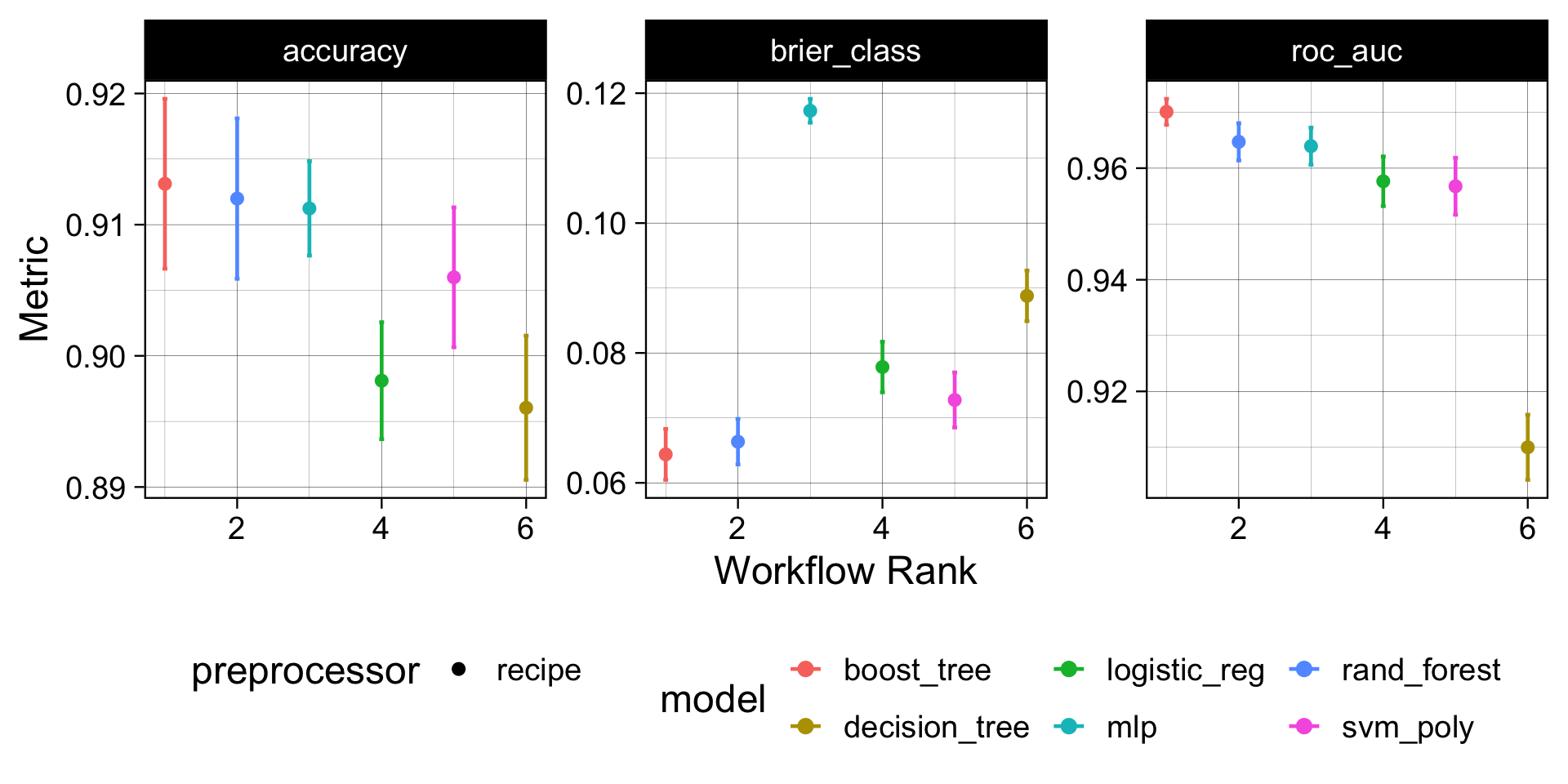
How to read this plot: Each dot is the mean CV metric across 10 folds; whiskers are ±1 SE. A model whose interval is highest and tightest is both accurate and consistent. Overlapping intervals mean the difference may not be meaningful — prefer the simpler model when in doubt.
Model Evaluation ![]()
Since the boosted-tree model gave the best out-of-the-box performance, we can:
- Select that model specification.
- Refit it to the full training set (no more cross-validation needed here — we’ve already used the folds to make the comparison).
- Assess it once against the held-out
forested_testset to get an honest estimate of skill on unseen data.
final_fit <- workflow() |>
  add_recipe(forested_recipe) |>
  # Selected model
  add_model(b_model) |>
  # Trained on the full training dataset
  fit(data = forested_train) |>
  # Validated against held-out data
  augment(new_data = forested_test)

# Final results
metrics(final_fit,  truth = forested, estimate = .pred_class)
#> # A tibble: 2 × 3
#>   .metric  .estimator .estimate
#>   <chr>    <chr>          <dbl>
#> 1 accuracy binary         0.909
#> 2 kap      binary         0.817
conf_mat(final_fit, truth = forested, estimate = .pred_class)
#>           Truth
#> Prediction Yes  No
#>        Yes 911  98
#>        No   63 706
Important
This is the untuned boosted tree — the same model we compared with workflow_set() above. It’s a baseline. In the tuning section below we’ll search over trees, learn_rate, and min_n for this same model and fit the final tuned version with last_fit() against this same forested_split. Expect the tuned version to beat this number.
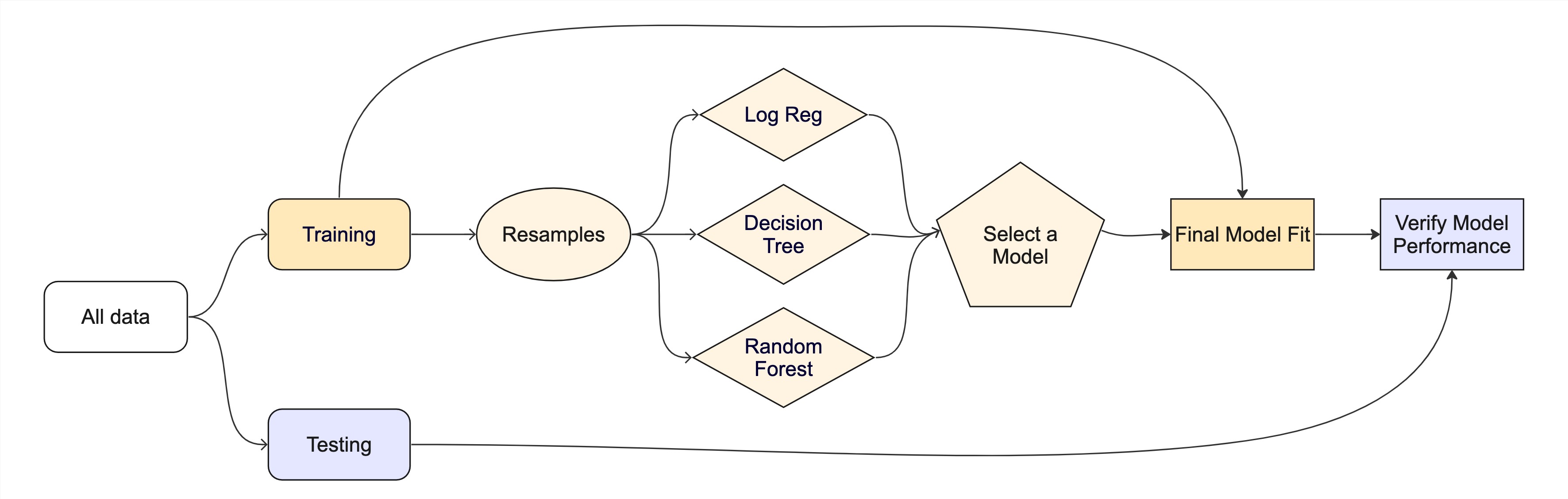
The whole game - status update
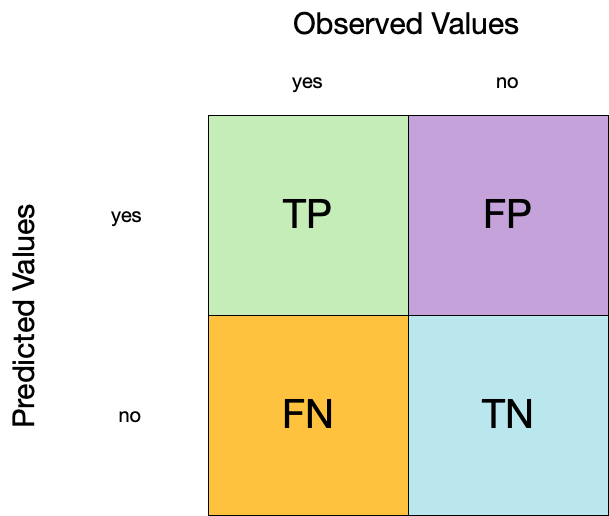
Confusion matrix ![]()
- A confusion matrix is a table that describes the performance of a classification model on a set of data for which the true values are known.
- It counts the number of accurate and false predictions, separated by the truth state
What to do with a confusion matrix
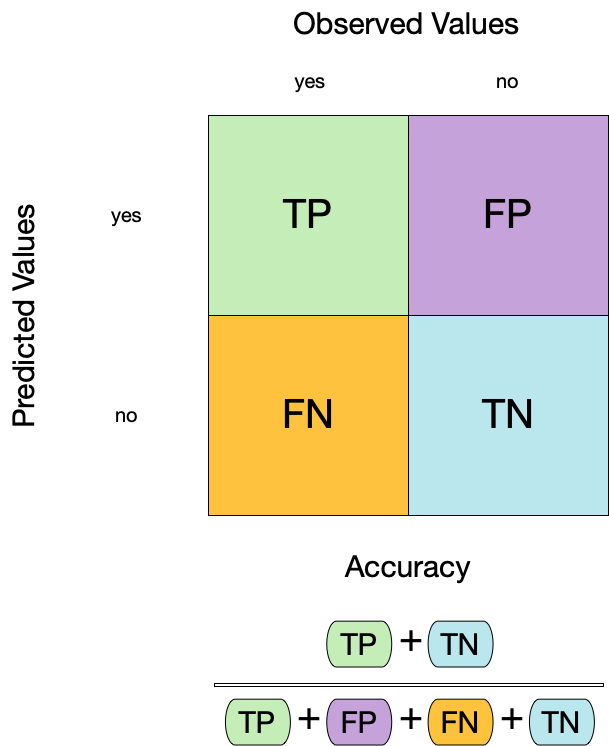
1. Accuracy ![]()
- Accuracy is the proportion of true results (both true positives and true negatives) among the total number of cases examined.
- It is a measure of the correctness of the model’s predictions.
- It is the most common metric used to evaluate classification models.
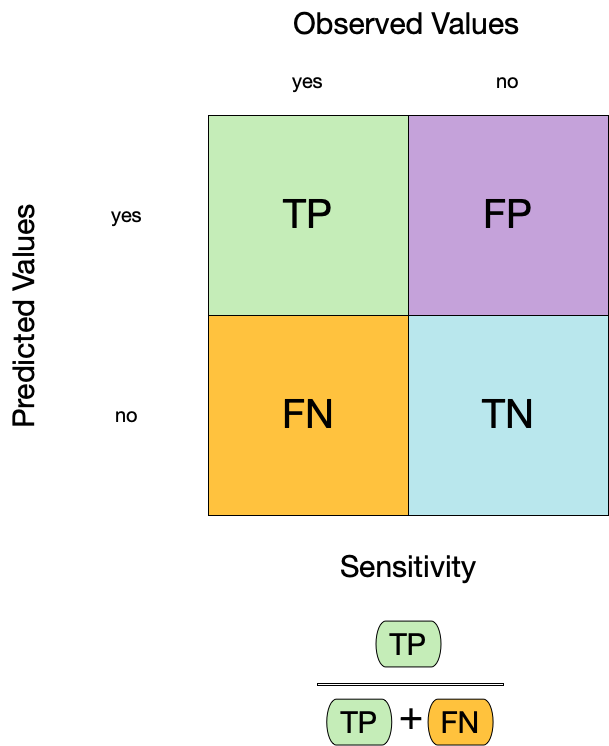
2. Sensitivity ![]()
- Sensitivity is the proportion of true positives to the sum of true positives and false negatives.
- It is useful for identifying the presence of a condition.
- It is also known as the true positive rate, recall, or probability of detection.
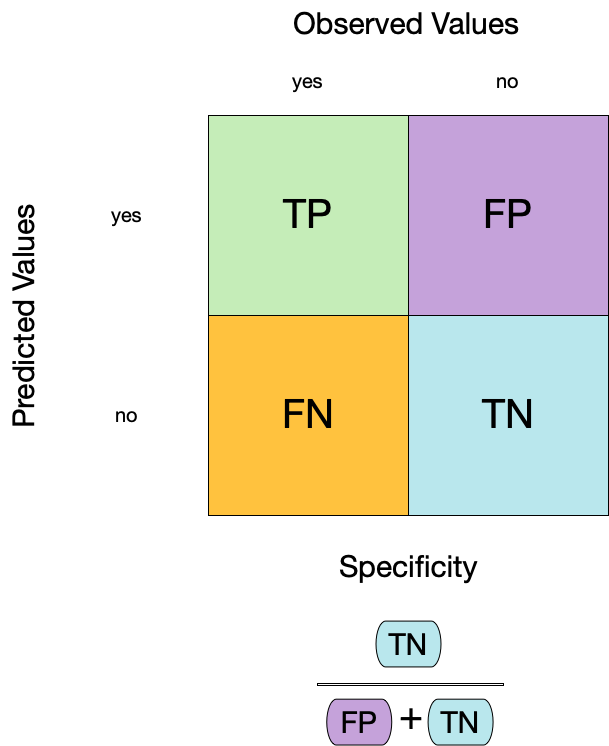
3. Specificity ![]()
- Specificity is the proportion of true negatives to the sum of true negatives and false positives.
- It is useful for identifying the absence of a condition.
- It is also known as the true negative rate, and is the complement of sensitivity.
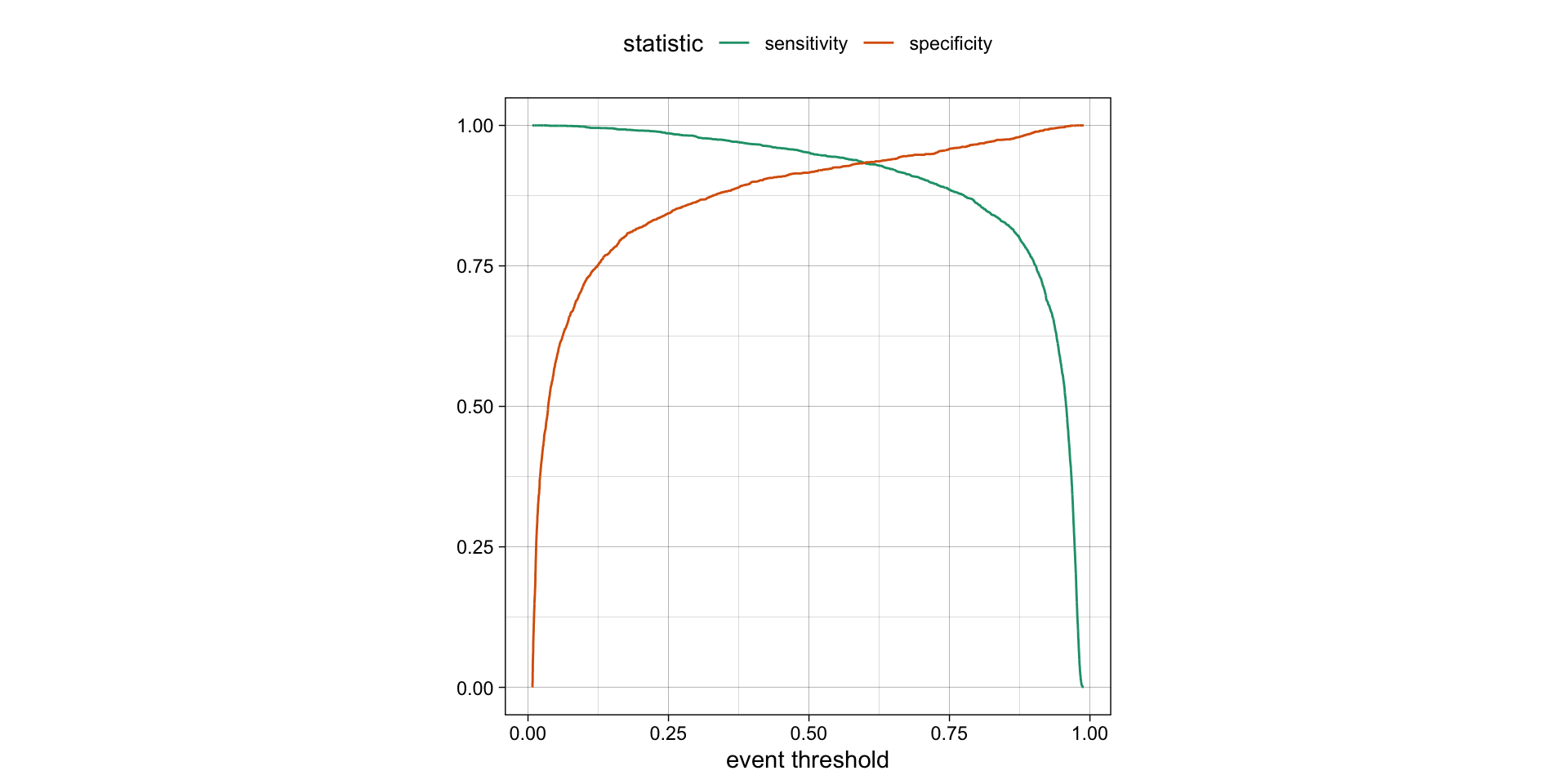
Varying the threshold
- The threshold can be varied to see how it affects the sensitivity and specificity of the model.
- This is done by plotting the sensitivity and specificity against the threshold.
- The threshold is varied from 0 to 1, and the sensitivity and specificity are calculated at each threshold.
- The plot shows the trade-off between sensitivity and specificity at different thresholds.
- The threshold can be chosen based on the desired balance between sensitivity and specificity.
ROC curves
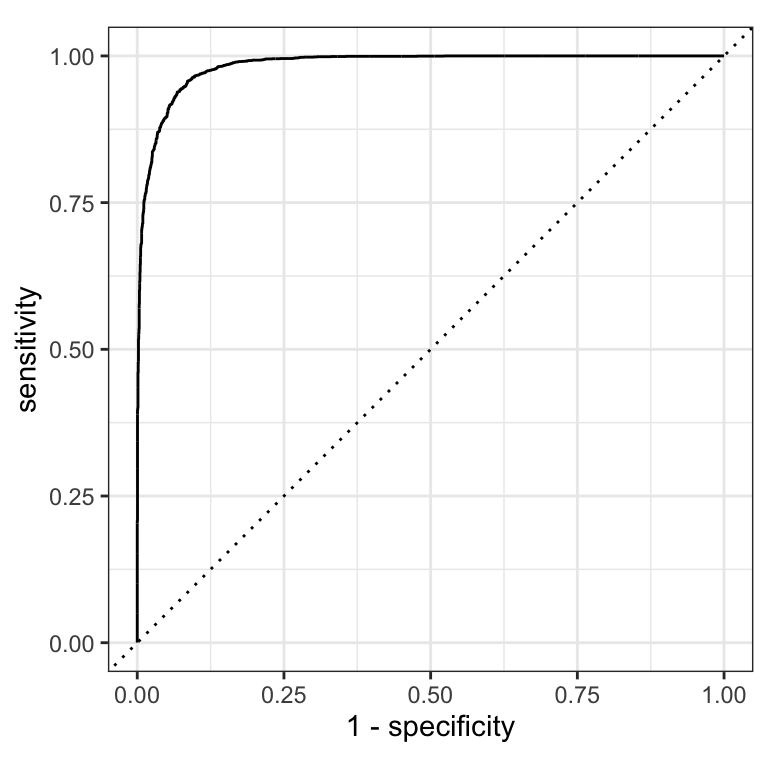
The previous plot showed sensitivity and specificity each varying with threshold. An ROC curve shows the same tradeoff differently: sweep every possible threshold and plot
- false positive rate (1 − specificity) on the x-axis
- true positive rate (sensitivity) on the y-axis
The diagonal line = random guessing (AUC 0.5). A good model hugs the top-left corner.
ROC curves
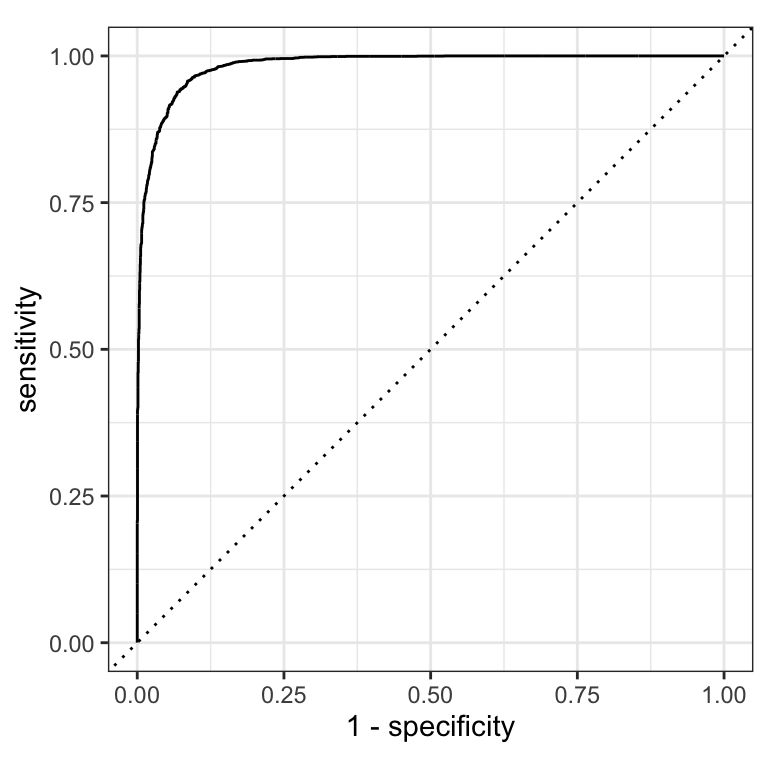
ROC AUC = area under the ROC curve = the model’s ability to separate the two classes.
Intuition: give the model a random forested and a random non-forested hexagon — AUC is the probability it scores the forested one higher.
- ROC AUC = 1 💯 — perfect separation
- ROC AUC = 0.5 😐 — no better than flipping a coin (the diagonal)
- ROC AUC < 0.5 😱 — actively worse than random
ROC curves ![]()
roc_curve() returns a tibble with one row per evaluated threshold — sensitivity and specificity at each point. roc_auc() summarises the whole curve into one number.
(AUC 0.7–0.8 = acceptable, 0.8–0.9 = good, >0.9 = excellent)
# Assumes _first_ factor level is event; there are options to change that
augment(forested_fit, new_data = forested_train) |>
  roc_curve(truth = forested, .pred_Yes) |>
  dplyr::slice(1, 20, 50)   # peek at 3 rows from the threshold sweep
#> # A tibble: 3 × 3
#> .threshold specificity sensitivity
#> <dbl> <dbl> <dbl>
#> 1 -Inf 0 1
#> 2 0.00869 0.0477 1
#> 3 0.00960 0.0863 1#> # A tibble: 1 × 3
#> .metric .estimator .estimate
#> <chr> <chr> <dbl>
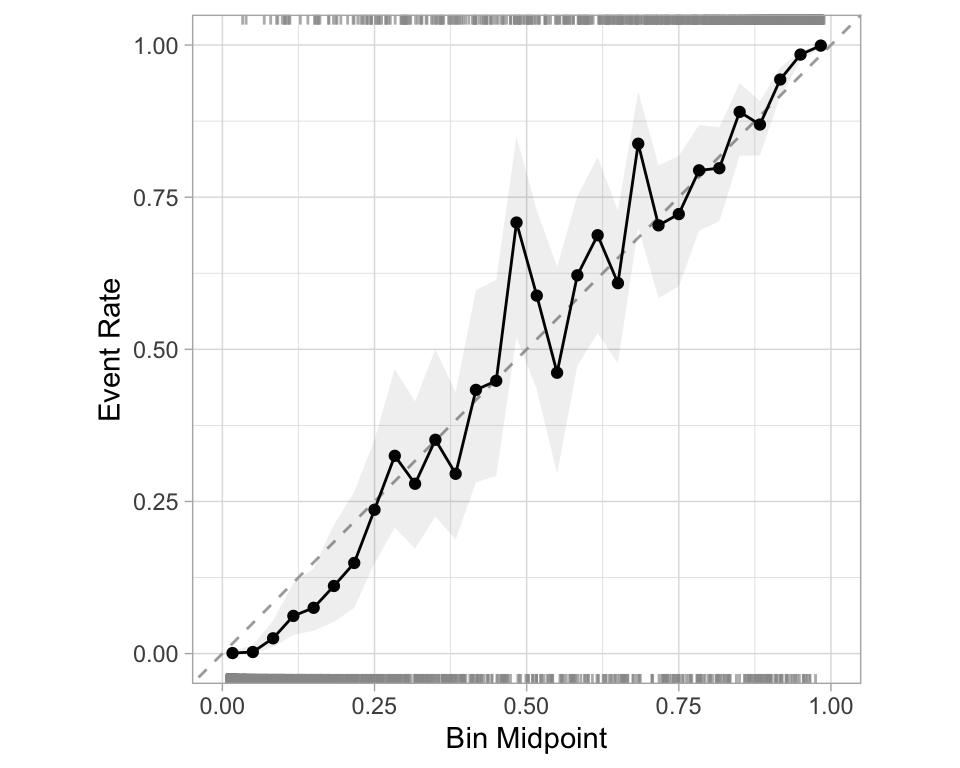
#> 1 roc_auc binary 0.984Separation vs calibration
The ROC captures separation. - The ROC curve shows the trade-off between sensitivity and specificity at different thresholds.
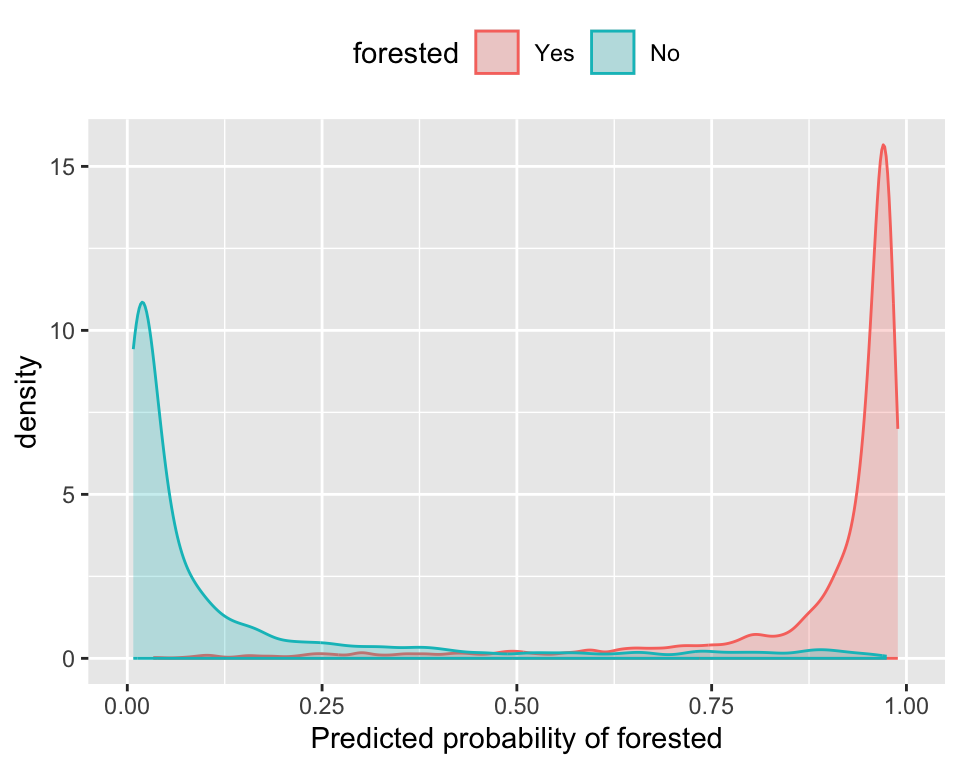
The Brier score captures calibration. - The Brier score is a measure of how well the predicted probabilities of an event match the actual outcomes.
- Good separation: the densities don’t overlap.
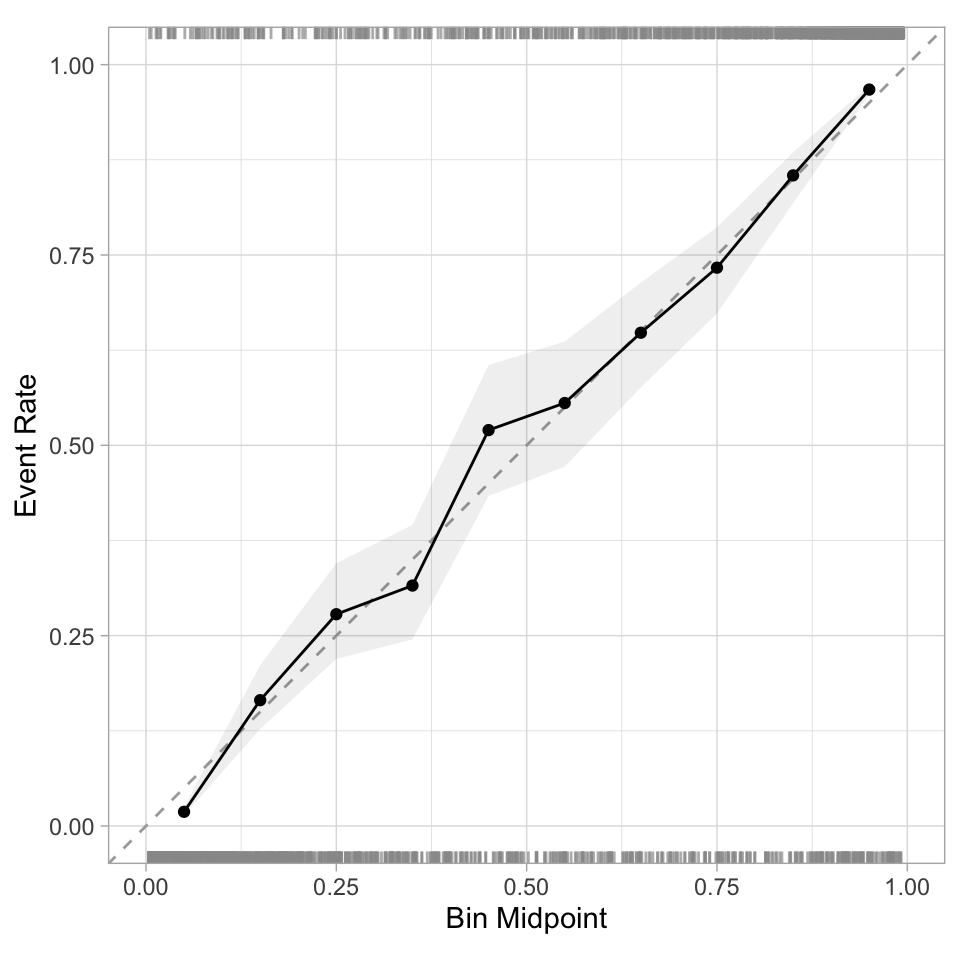
- Good calibration: the calibration line follows the diagonal.
Calibration plot: We bin observations according to predicted probability. In the bin for 20%-30% predicted prob, we should see an event rate of ~25% if the model is well-calibrated.
Custom Metric Sets ![]()
We can use metric_set() to combine multiple calculations into one
forested_metrics <- metric_set(accuracy, specificity, sensitivity)

augment(forested_fit, new_data = forested_train) |>
  forested_metrics(truth = forested, estimate = .pred_class)
#> # A tibble: 3 × 3
#>   .metric     .estimator .estimate
#>   <chr>       <chr>          <dbl>
#> 1 accuracy    binary         0.936
#> 2 specificity binary         0.916
#> 3 sensitivity binary         0.952
Metrics and metric sets work with grouped data frames!
augment(forested_fit, new_data = forested_train) |>
  group_by(tree_no_tree) |>
  accuracy(truth = forested, estimate = .pred_class)
#> # A tibble: 2 × 4
#>   tree_no_tree .metric  .estimator .estimate
#>   <fct>        <chr>    <chr>          <dbl>
#> 1 Tree         accuracy binary         0.942
#> 2 No tree      accuracy binary         0.928

augment(forested_fit, new_data = forested_train) |>
  group_by(tree_no_tree) |>
  specificity(truth = forested, estimate = .pred_class)
#> # A tibble: 2 × 4
#>   tree_no_tree .metric     .estimator .estimate
#>   <fct>        <chr>       <chr>          <dbl>
#> 1 Tree         specificity binary         0.428
#> 2 No tree      specificity binary         0.976
Note
The specificity for "Tree" is a good bit lower than it is for "No tree".
Among hexagons where the remote sensing index shows tree cover, the model more often predicts forested even when the ground truth is non-forested — these are the plots most likely to be confused.
Reusing what we already built ![]()
We’re going to keep tuning on the same forested classification problem — no new data, no new recipe — so the story stays coherent.
From earlier in this deck we already have:
forested_split— 75/25 stratified splitforested_train,forested_test— 75% training, 25% testforested_folds— 10-fold CV on the training setforested_recipe— impute → dummy → normalize
Tagging parameters for tuning ![]()

With tidymodels, you can mark the parameters that you want to optimize with a value of tune().
The function itself just returns… itself:
Boosted Tree Tuning Parameters ![]()
![]()
b_mod <-
  boost_tree(trees = tune(), learn_rate = tune()) |>
  set_mode("classification") |>
  set_engine("xgboost")

(b_wflow <- workflow(forested_recipe, b_mod))
#> ══ Workflow ════════════════════════════════════════════════════════════════════════════════════════════════════════════════════════════════════════════════════════════════════════════════════════════
#> Preprocessor: Recipe
#> Model: boost_tree()
#>
#> ── Preprocessor ────────────────────────────────────────────────────────────────────────────────────────────────────────────────────────────────────────────────────────────────────────────────────────
#> 3 Recipe Steps
#>
#> • step_impute_mean()
#> • step_dummy()
#> • step_normalize()
#>
#> ── Model ───────────────────────────────────────────────────────────────────────────────────────────────────────────────────────────────────────────────────────────────────────────────────────────────
#> Boosted Tree Model Specification (classification)
#>
#> Main Arguments:
#> trees = tune()
#> learn_rate = tune()
#>
#> Computational engine: xgboost1. Grid search
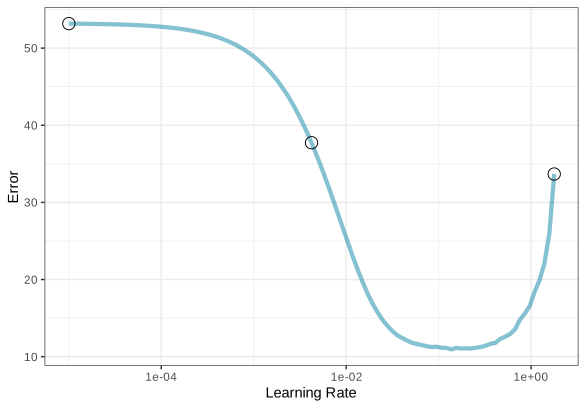
Most basic (but very effective) way to tune models
A small grid of points trying to minimize the error via learning rate:
1. Grid search
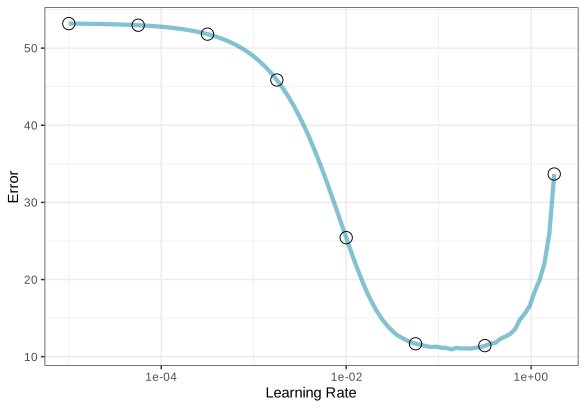
In reality we would probably sample the space more densely:
2. Iterative Search
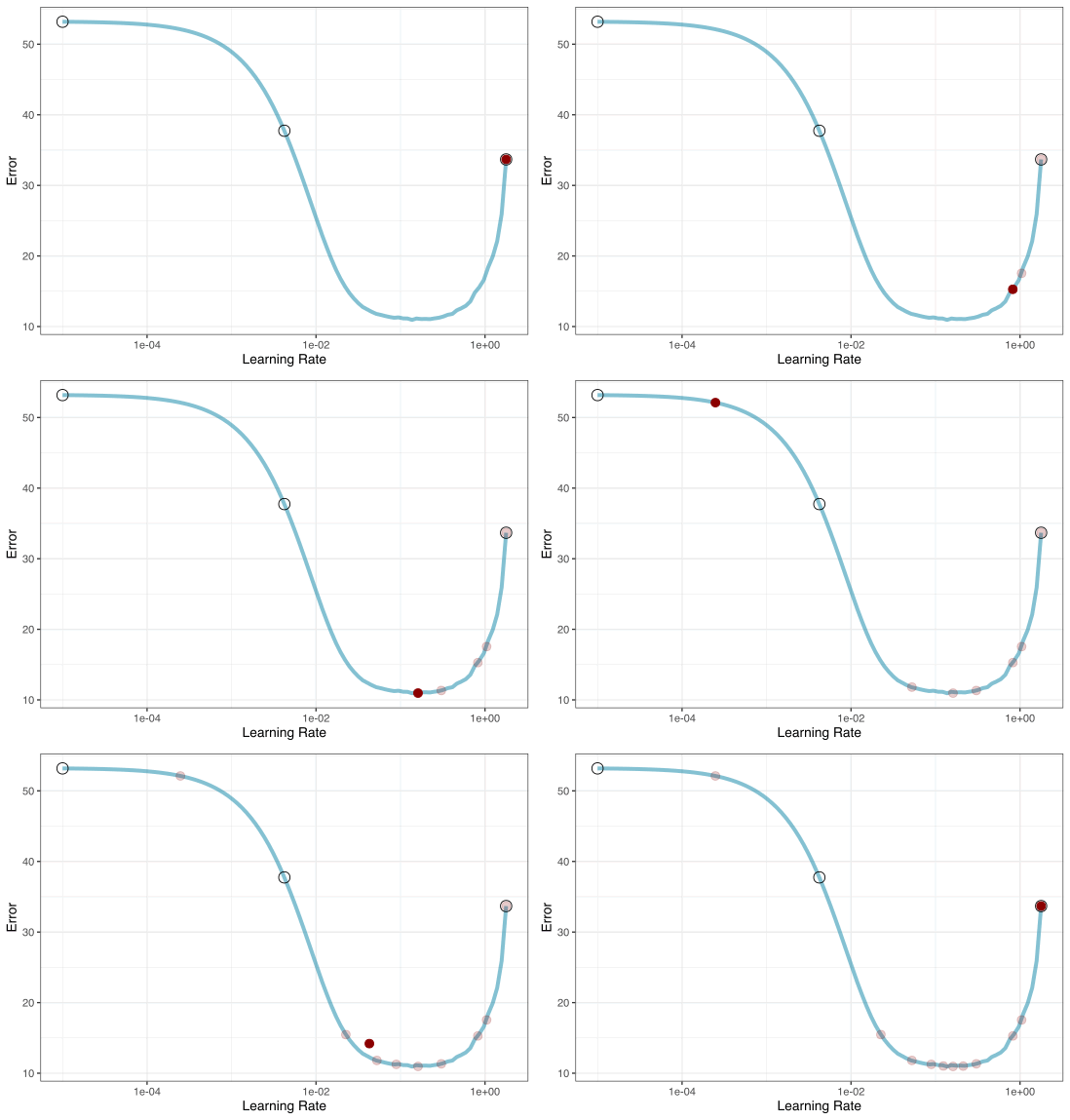
We could start with a few points and search the space:
Different types of grids ![]()

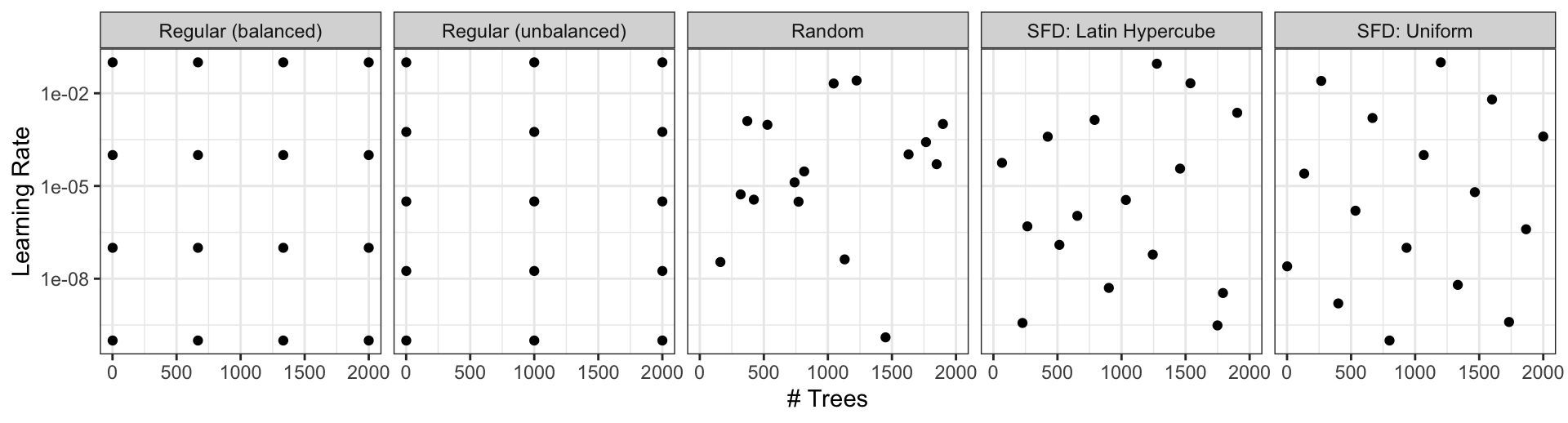
Space-filling designs (SFD) attempt to cover the parameter space without redundant candidates. We recommend these the most.
Create a grid ![]()
![]()
A parameter set can be updated (e.g. to change the ranges).
Create a grid ![]()
![]()
- The
grid_*()functions create a grid of parameter values to evaluate. - The
grid_space_filling()function creates a space-filling design (SFD) of parameter values to evaluate. - The
grid_regular()function creates a regular grid of parameter values to evaluate. - The
grid_random()function creates a random grid of parameter values to evaluate. - The
grid_latin_hypercube()function creates a Latin hypercube design of parameter values to evaluate. - The
grid_max_entropy()function creates a maximum entropy design of parameter values to evaluate.
Create a SFD curve ![]()
![]()
#> # A tibble: 25 × 2
#>    trees learn_rate
#>    <int>      <dbl>
#>  1     1    0.0287
#>  2    84    0.00536
#>  3   167    0.121
#>  4   250    0.00162
#>  5   334    0.0140
#>  6   417    0.0464
#>  7   500    0.196
#>  8   584    0.00422
#>  9   667    0.00127
#> 10   750    0.0178
#> # ℹ 15 more rows
Create a regular grid ![]()
![]()
#> # A tibble: 16 × 2
#>    trees learn_rate
#>    <int>      <dbl>
#>  1     1    0.001
#>  2   667    0.001
#>  3  1333    0.001
#>  4  2000    0.001
#>  5     1    0.00681
#>  6   667    0.00681
#>  7  1333    0.00681
#>  8  2000    0.00681
#>  9     1    0.0464
#> 10   667    0.0464
#> 11  1333    0.0464
#> 12  2000    0.0464
#> 13     1    0.316
#> 14   667    0.316
#> 15  1333    0.316
#> 16  2000    0.316
Update parameter ranges ![]()
![]()
b_param <-
  b_wflow |>
  extract_parameter_set_dials() |>
  update(trees = trees(c(1L, 100L)),
         learn_rate = learn_rate(c(-5, -1)))

set.seed(712)
(grid <-
  b_param |>
  grid_space_filling(size = 25))
#> # A tibble: 25 × 2
#> trees learn_rate
#> <int> <dbl>
#> 1 1 0.00215
#> 2 5 0.000147
#> 3 9 0.0215
#> 4 13 0.0000215
#> 5 17 0.000681
#> 6 21 0.00464
#> 7 25 0.0464
#> 8 29 0.0001
#> 9 34 0.0000147
#> 10 38 0.001
#> # ℹ 15 more rowsThe results ![]()
![]()

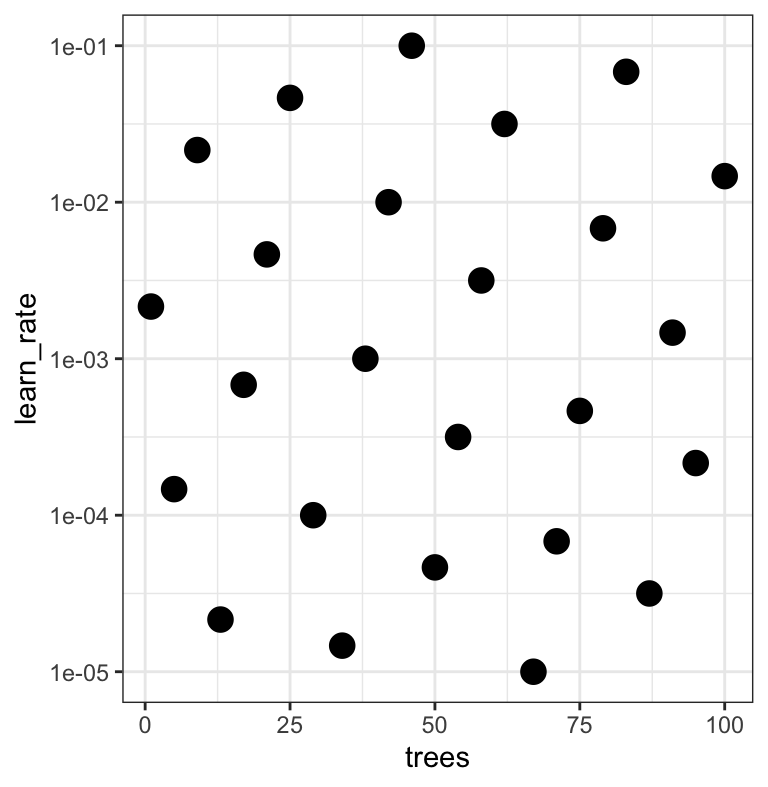
Note that the learning rates are uniform on the log-10 scale — both tuning parameters are shown.
Choosing tuning parameters ![]()
![]()
![]()
![]()

Let’s take our previous model and tune more parameters:
b_mod <-
  boost_tree(trees = tune(), learn_rate = tune(), min_n = tune()) |>
  set_mode("classification") |>
  set_engine("xgboost")

b_wflow <- workflow(forested_recipe, b_mod)

# Widen the trees range for the search
b_param <-
  b_wflow |>
  extract_parameter_set_dials() |>
  update(trees = trees(c(1L, 1000L)))
Grid Search ![]()
![]()
![]()
Grid Search ![]()
![]()
![]()
#> # Tuning results
#> # 10-fold cross-validation
#> # A tibble: 10 × 5
#>    splits             id     .metrics          .notes           .predictions
#>    <list>             <chr>  <list>            <list>           <list>
#>  1 <split [5116/569]> Fold01 <tibble [75 × 7]> <tibble [0 × 4]> <tibble [14,225 × 9]>
#>  2 <split [5116/569]> Fold02 <tibble [75 × 7]> <tibble [0 × 4]> <tibble [14,225 × 9]>
#>  3 <split [5116/569]> Fold03 <tibble [75 × 7]> <tibble [0 × 4]> <tibble [14,225 × 9]>
#>  4 <split [5116/569]> Fold04 <tibble [75 × 7]> <tibble [0 × 4]> <tibble [14,225 × 9]>
#>  5 <split [5116/569]> Fold05 <tibble [75 × 7]> <tibble [0 × 4]> <tibble [14,225 × 9]>
#>  6 <split [5117/568]> Fold06 <tibble [75 × 7]> <tibble [0 × 4]> <tibble [14,200 × 9]>
#>  7 <split [5117/568]> Fold07 <tibble [75 × 7]> <tibble [0 × 4]> <tibble [14,200 × 9]>
#>  8 <split [5117/568]> Fold08 <tibble [75 × 7]> <tibble [0 × 4]> <tibble [14,200 × 9]>
#>  9 <split [5117/568]> Fold09 <tibble [75 × 7]> <tibble [0 × 4]> <tibble [14,200 × 9]>
#> 10 <split [5117/568]> Fold10 <tibble [75 × 7]> <tibble [0 × 4]> <tibble [14,200 × 9]>
Grid results ![]()
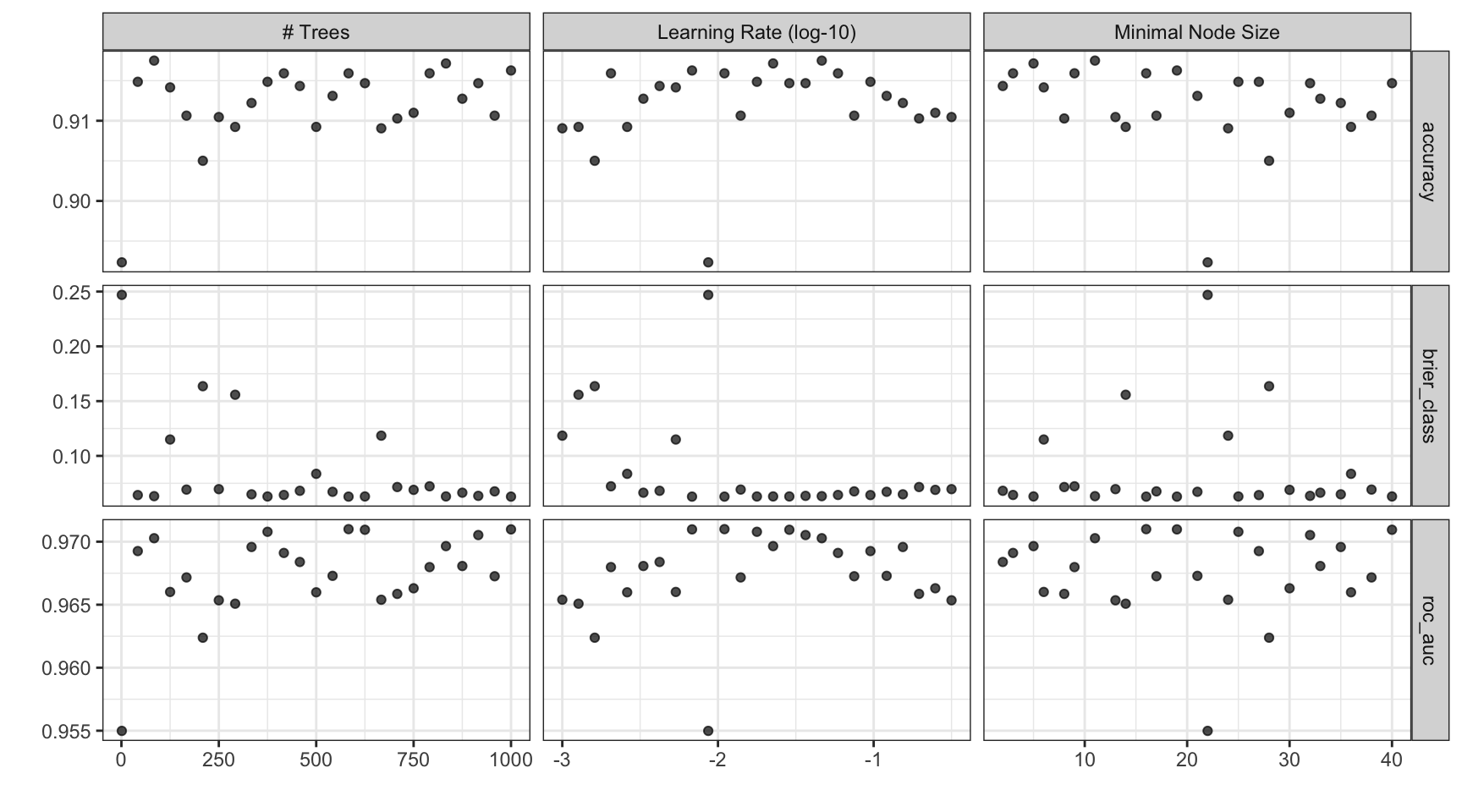
Tuning results ![]()
#> # A tibble: 75 × 9
#>    trees min_n learn_rate .metric     .estimator   mean     n   std_err .config
#>    <int> <int>      <dbl> <chr>       <chr>       <dbl> <int>     <dbl> <chr>
#>  1     1    22    0.00866 accuracy    binary     0.892     10 0.00365   pre0_mod01_post0
#>  2     1    22    0.00866 brier_class binary     0.247     10 0.0000270 pre0_mod01_post0
#>  3     1    22    0.00866 roc_auc     binary     0.955     10 0.00284   pre0_mod01_post0
#>  4    42    27    0.0953  accuracy    binary     0.915     10 0.00365   pre0_mod02_post0
#>  5    42    27    0.0953  brier_class binary     0.0642    10 0.00220   pre0_mod02_post0
#>  6    42    27    0.0953  roc_auc     binary     0.969     10 0.00229   pre0_mod02_post0
#>  7    84    11    0.0464  accuracy    binary     0.918     10 0.00248   pre0_mod03_post0
#>  8    84    11    0.0464  brier_class binary     0.0632    10 0.00206   pre0_mod03_post0
#>  9    84    11    0.0464  roc_auc     binary     0.970     10 0.00207   pre0_mod03_post0
#> 10   125     6    0.00536 accuracy    binary     0.914     10 0.00382   pre0_mod04_post0
#> # ℹ 65 more rows
Iterative Search — Bayesian Optimization ![]()
- Fits a Gaussian process surrogate model on results so far
- Suggests the most promising next candidate (balances exploration vs. exploitation)
- Requires far fewer iterations than grid search to reach similar quality
- Can warm-start from an existing grid search result to avoid re-evaluating already-known points
Key function: tune_bayes() — same syntax as tune_grid()
Bayesian Search Example ![]()
![]()
set.seed(9)
b_bayes <-
  b_wflow |>
  tune_bayes(
    resamples  = forested_folds,
    initial    = b_res,       # warm-start: skip candidates already evaluated
    iter       = 10,
    param_info = b_param,
    metrics    = metric_set(roc_auc)
  )

show_best(b_bayes, metric = "roc_auc")
#> # A tibble: 5 × 10
#> trees min_n learn_rate .metric .estimator mean n std_err .config .iter
#> <int> <int> <dbl> <chr> <chr> <dbl> <int> <dbl> <chr> <int>
#> 1 344 5 0.0217 roc_auc binary 0.972 10 0.00180 iter06 6
#> 2 229 2 0.0237 roc_auc binary 0.972 10 0.00181 iter05 5
#> 3 982 25 0.0155 roc_auc binary 0.972 10 0.00197 iter08 8
#> 4 404 15 0.0290 roc_auc binary 0.972 10 0.00192 iter04 4
#> 5 569 25 0.0247 roc_auc binary 0.972 10 0.00190 iter01 1Tip
Passing initial = b_res means Bayesian search starts from what the grid search already learned — no wasted evaluations on territory already explored.
Bayesian Search Results ![]()
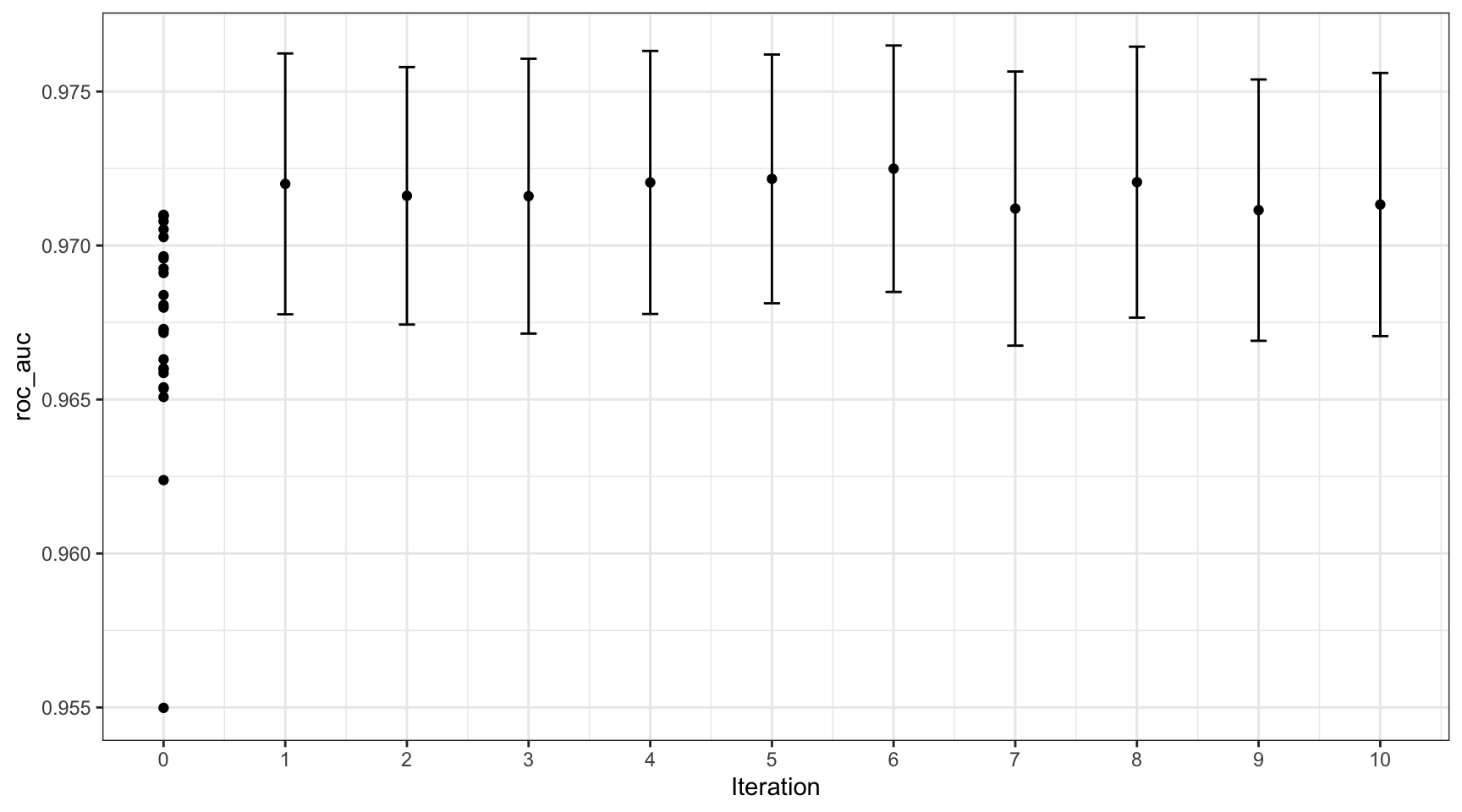
Choose a parameter combination ![]()
#> # A tibble: 5 × 9
#>   trees min_n learn_rate .metric .estimator  mean     n std_err .config
#>   <int> <int>      <dbl> <chr>   <chr>      <dbl> <int>   <dbl> <chr>
#> 1   583    16    0.0110  roc_auc binary     0.971    10 0.00197 pre0_mod15_post0
#> 2  1000    19    0.00681 roc_auc binary     0.971    10 0.00204 pre0_mod25_post0
#> 3   625    40    0.0287  roc_auc binary     0.971    10 0.00199 pre0_mod16_post0
#> 4   375    25    0.0178  roc_auc binary     0.971    10 0.00213 pre0_mod10_post0
#> 5   916    32    0.0365  roc_auc binary     0.971    10 0.00203 pre0_mod23_post0
Choose a parameter combination ![]()
Create your own tibble for final parameters or use one of the tune::select_*() functions:
Checking Calibration ![]()
![]()

The final fit!
#> # A tibble: 3 × 4
#>   .metric     .estimator .estimate .config
#>   <chr>       <chr>          <dbl> <chr>
#> 1 accuracy    binary        0.908  pre0_mod0_post0
#> 2 roc_auc     binary        0.968  pre0_mod0_post0
#> 3 brier_class binary        0.0666 pre0_mod0_post0
# Confusion matrix on the held-out test set
collect_predictions(final_fit) |>
conf_mat(truth = forested, estimate = .pred_class)#> Truth
#> Prediction Yes No
#> Yes 910 100
#> No 64 704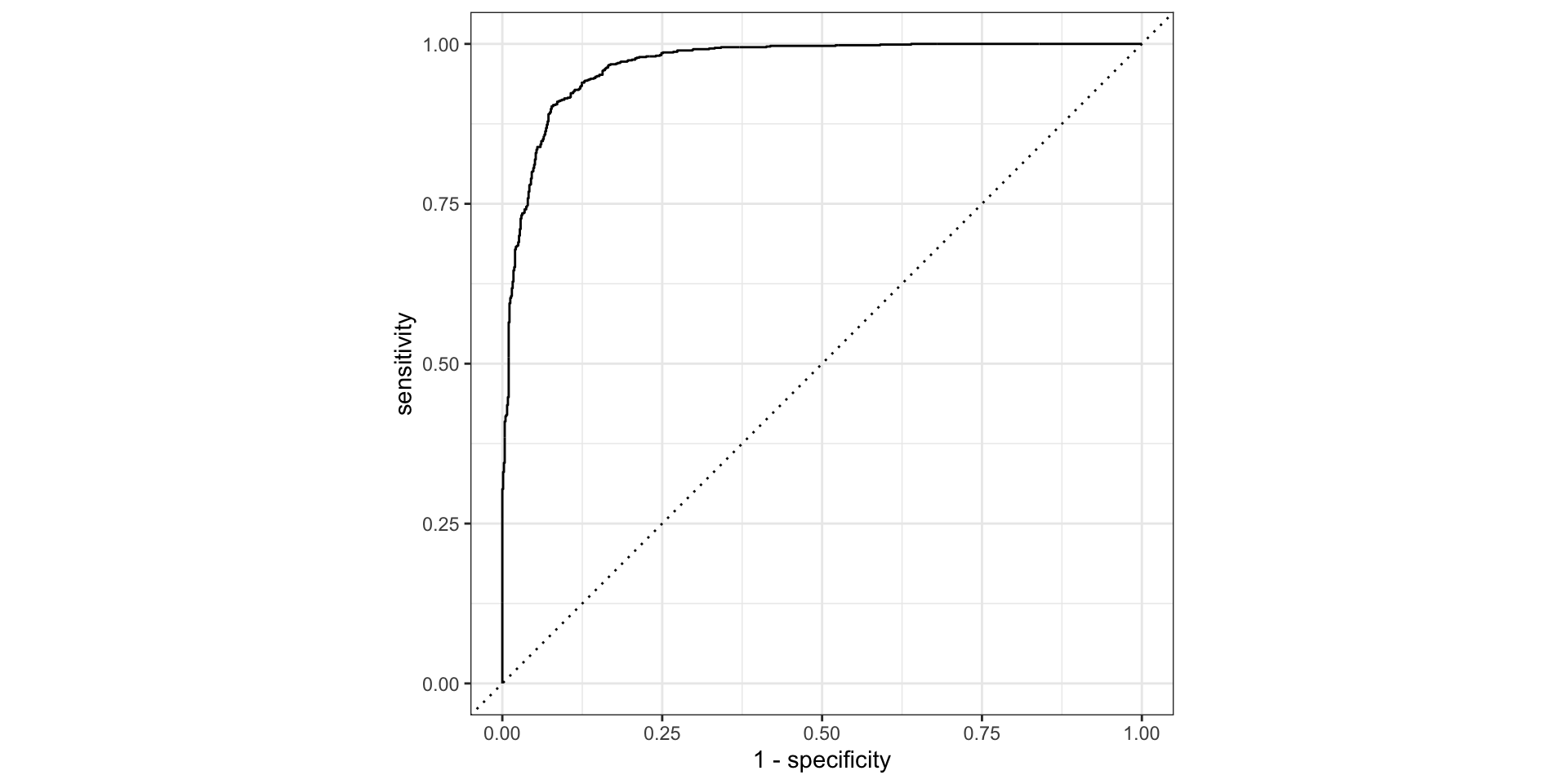
What did the model learn? ![]()

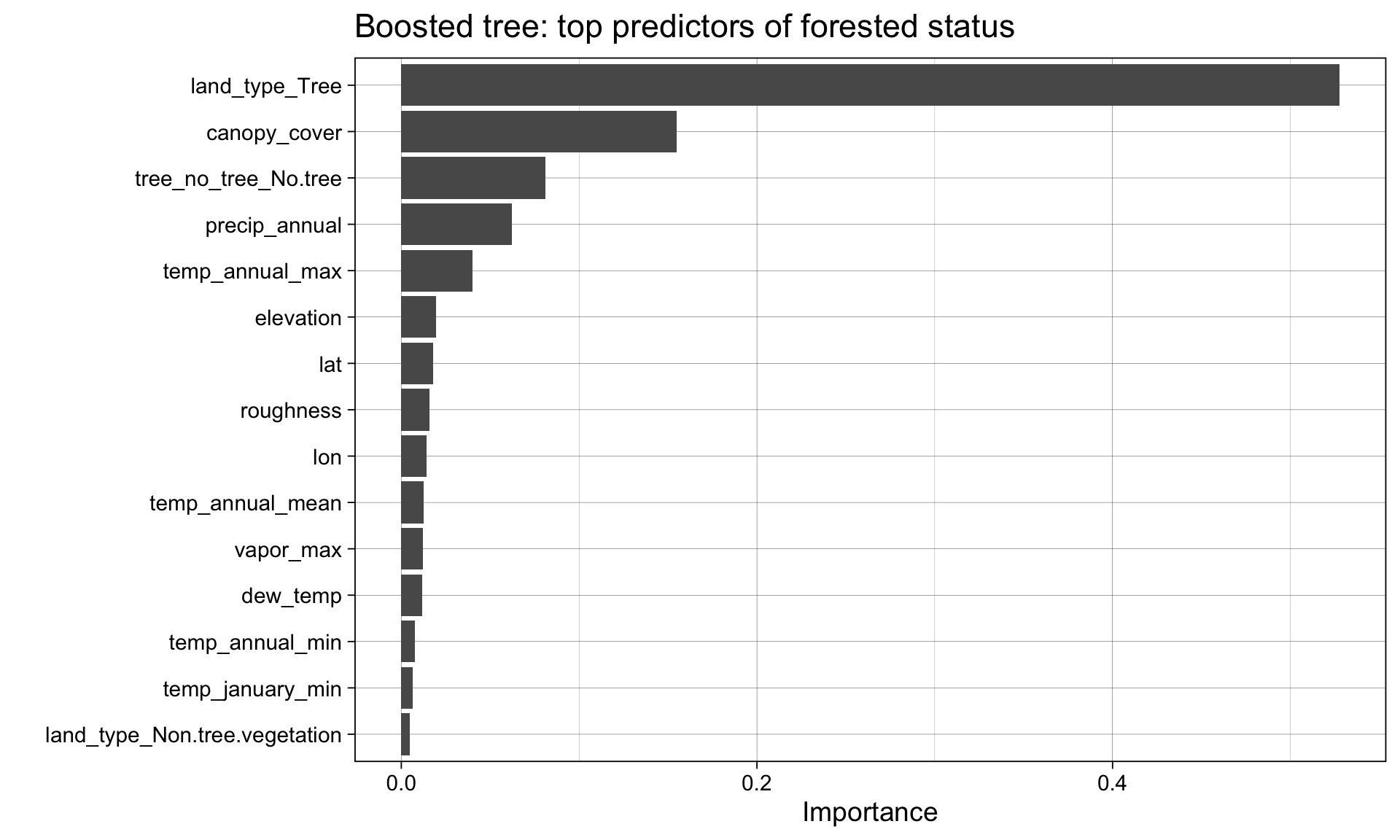
Variable importance connects performance back to science: which features drove the prediction?
Note
Recall from week 5: different families give different importance estimates — logistic regression uses standardized coefficients, random forest uses impurity reduction, boosted trees use gain.
Agreement across families = robust signal. Disagreement = worth investigating.
The whole game